
You walked the job Friday. Twenty-two punch items. You typed them up, snapped photos, built a clean PDF, and sent it to your subs that afternoon. Monday you walk it again. Half the items are still open. Two subs swear they never saw the list. The painter says the photo was too small to tell which window you meant. And the PDF you sent is already wrong, because you closed four items over the weekend and added three new ones.
If you build for a living, you've lived this. The problem usually isn't the subs. It's how the punch list got to them.
The easiest way to send a punch list to your subs is the way they'll actually open it: one link, no account, no app to download, with the photo right there and the list filtered to just their items. When you send it that way, the excuses dry up. This post walks through how to do that, and why every other method leaks.
Why subs ignore the punch list you send
Walk through the usual ways a punch list gets sent and you'll see the leak every time.
You made them download an app or create a login. The fastest way to guarantee a sub never opens your punch list is to put a wall in front of it. Download this app. Make an account. Set a password. Your drywall guy is not going to do any of that to see four items. He's got six other jobs. The list dies at the login screen.
The PDF went stale the second you sent it. A PDF is a photograph of the list at one moment. The moment you close an item, add one, or move a due date, that PDF is wrong. Now your sub is working off old information, and you're texting corrections, and nobody trusts the document anymore.
It got buried in a group text. Punch items dropped into a thread with a dozen other messages disappear by lunch. The sub scrolls past it. There's no list to come back to, just a wall of texts and a couple of photos with no context.
There was no photo, or the photo was useless. "Touch up paint in the master" means nothing to a painter on a 4,000-square-foot custom home. Which wall? A punch item without a photo is an argument waiting to happen.
Nobody knew it was theirs. A list of twenty items with no clear owner per line is just noise to a sub. He doesn't know which four are his, so he treats all twenty as somebody else's problem.
Every one of those is a delivery problem, not a sub problem. Fix the delivery and the same subs start closing items.
What a sub actually needs to act on a punch item
Strip it down. To close an item, a sub needs six things, and not one of them is a login.
What it is. A short, plain description. "Caulk gap at tub surround," not "bathroom issue."
Where it is. The room or the location. On a big house this is half the battle.
A photo. The single fastest way to kill a back-and-forth. He sees the photo, he knows the spot, he fixes it.
Who owns it. His name on the item so he knows it's his, not the framer's.
When it's due. A date, so it's not "whenever."
A way to open it in two seconds. No password, no download, no friction. Tap and it's there.
Give a sub those six things and the item gets closed. Miss any one of them and you're chasing.
How to send a punch list to your subs so they actually use it
Here's the method, in plain steps. You can do most of this with whatever you've got. One step is much easier with the right tool, and I'll be straight with you about where that is.
1. Write the item like the sub is standing next to you. What it is, where it is, one clear sentence. Skip the contractor shorthand only you understand.
2. Attach a photo to every item. Take the photo on your walkthrough, while you're standing at the defect. Don't try to remember it later. The photo is the part that saves you the phone call.
3. Tag the responsible sub on each item. Every line gets an owner. The painter sees painter items. The plumber sees plumber items. Nobody gets a wall of stuff that isn't theirs.
4. Send it as a link, not a file. This is the whole game. A link can stay current. A file can't. When you send a link, the sub taps it and sees his items in a browser, like opening any web page. No app store, no account, no password.
5. Filter it to just that sub. Send the plumber a link that shows plumbing items only. He opens it, sees his four, knocks them out. No scrolling past everyone else's work.
A punch list app that does only this
This is exactly what PunchPad was built to do.
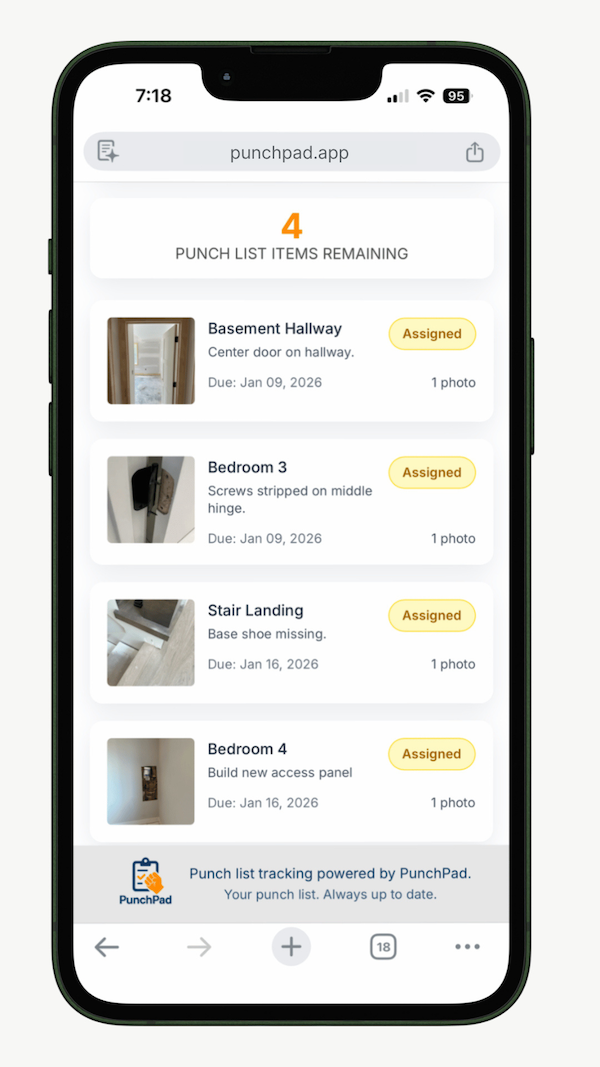
You log the item on your walkthrough, snap the photo, tag the sub, and share a live link. The sub taps it and sees his punch items in a browser on his phone. No download, no login, no account on his end, ever. The link updates on its own as you change the list, so what he's looking at is always today's list, not Friday's. It's a dedicated punch list tool, built by a custom home builder who got tired of running punch lists out of his Notes app and group texts. That's all it does, and that's the point.
You don't need a piece of software to follow the principle. You need a way to send a list that stays current and doesn't make the sub jump through hoops. A live link does that. A PDF can't.
A sub's live punch list, opened right in his browser. Photo, location, and due date on every item. No app, no login.
That's how you share a live punch list report with your subs — one link that stays current.
Why a static PDF is the wrong tool for a punch list
A PDF is fine for a contract. It's the wrong tool for a punch list, and here's the reason: a punch list is alive. It changes every day. Items open, items close, due dates move, new ones show up on the next walk.
The moment you change the list, every PDF you already sent is out of date. So you either send a new PDF every single day, which nobody does and nobody reads, or your subs work off a stale list and call you when it doesn't match what you told them this morning. Both waste your time.
A live link never has that problem. There's one list. You change it, and the link shows the change. The sub is always looking at the current version, because there's only one version. No "which PDF is the latest" confusion. No re-sending. The link you sent two weeks ago still works and still shows today's items.
That's the difference between sending a snapshot and sending the actual list.
Who gets to mark an item done
One more thing that separates a punch list that closes from one that drags: the builder controls completion.
If your subs can mark their own items complete, your list lies to you. The painter says it's done, you walk it, it's not done, and now the item is buried under a green checkmark you have to go reopen. Closeout turns into archaeology.
Keep status in your hands. The sub does the work and tells you it's ready. You walk it. You mark it done. That's the only version of "complete" that holds up at closeout, because it's the one you verified with your own eyes. The sub sees the live list and knows exactly what's still open, but the checkmark is yours.
This isn't about not trusting your subs. It's about one source of truth that matches the actual jobsite, so the punch list you hand the owner at closeout is real.
The short version
Subs don't ignore punch lists because they're lazy. They ignore them because you sent something they couldn't open, couldn't trust, or couldn't tell was theirs. Send a current link, no login, with a photo on every item, filtered to that sub, and keep the done button to yourself. Do that and your punch list starts closing itself.
FAQ
Why shouldn't I just send a punch list PDF?
A PDF is a snapshot of the list at one moment. The second you open, close, or change an item, the PDF you already sent is wrong. A live link shows the current list every time, so you're not re-sending files or fielding calls about which version is right.
Can a sub mark his own punch items complete?
Subs shouldn't be able to. The sub sees what's open and does the work, but the builder marks items done after walking them. That keeps the list honest and your closeout clean.
How do I make sure a sub only sees his own items?
Tag each punch item with the responsible sub, then filter the list to that sub before you share it. The plumber gets a link showing plumbing items only, so he's not scrolling past the painter's work to find his.
Stop sending punch lists your subs ignore.
Start your free 7-day PunchPad trial, no credit card required, and send your next punch list as a link they'll actually open.


