
Complete Punch List Guide for Builders
A punch list is only useful if it stays current. This guide breaks down what a construction punch list is, when to use one, what to include, and how builders actually manage punch work without letting small issues turn into delays at the end of the job.
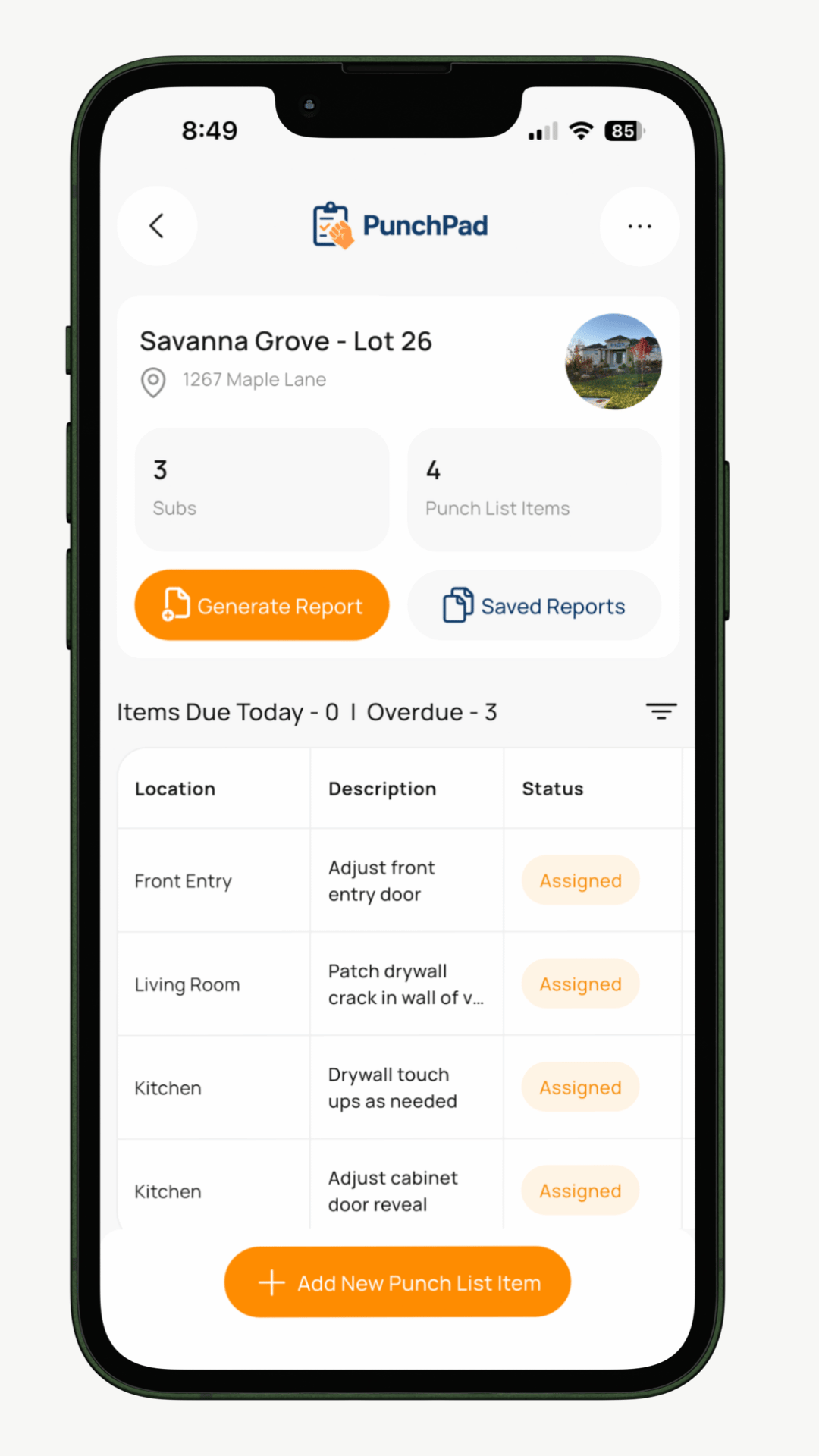
What Is a Punch List in Construction?
A punch list is a running list of work that still needs to be completed, corrected, or verified before a project or phase is considered finished. It usually includes incomplete work, damaged materials, installation issues, missed details, and items that do not match the plans, selections, or expected quality.
A lot of builders think about punch lists as something that happens right before final walkthrough, but that is where jobs get messy. The best punch lists start much earlier. Framing corrections, waterproofing issues, cabinet damage, paint touch-ups, hardware adjustments, and final trim details all belong on a punch list when they are found, not weeks later when everyone is harder to track down.
Why Punch Lists Matter More Than Most Builders Realize
Punch list problems are rarely about one missed item. The real problem is what happens after that item gets missed. The wrong trade gets blamed, photos never get shared, nobody knows if the item was actually fixed, and the builder ends up wasting time chasing details that should have been clear the first time.
A clean punch list system helps you do three things. It shows exactly what needs to be done. It makes it obvious who is responsible. It keeps the list current as the job changes.
When that system breaks, closeout drags out, trades get frustrated, and clients feel like the project is less organized than it really is.
When Should You Start a Punch List?
You should start a punch list the minute boots hit the ground and keep using it through the life of the project.
Best times to use a punch list
Pre-slab pour
Framing walkthrough
Rough-In corrections
Insulation and drywall prep
Cabinet and millwork installs
Tile and flooring install
Paint
Final walkthrough
Warranty follow-up
The biggest mistake most builders make is waiting until the end of the project to start a punch list. By then, items are harder to verify, photos are missing, and trades are already moving to other jobs. A rolling punch list keeps small issues from stacking up into a stressful finish.
Who Owns the Punch List?
The builder or superintendent owns the list.
That does not mean every trade issue is your fault. It means the builder is responsible for making sure the list is accurate, current, and clearly communicated. Subs can fix the work, but they should not be the ones controlling the master list.
That is one reason old-school punch list workflows fail. Notes are spread across texts, marked-up plans, paper sheets, and phone photos. The builder ends up piecing the truth together from five different places.
What Should Be Included in a Good Punch List?
A good punch list item needs enough detail that the right person can fix it without a long phone call.
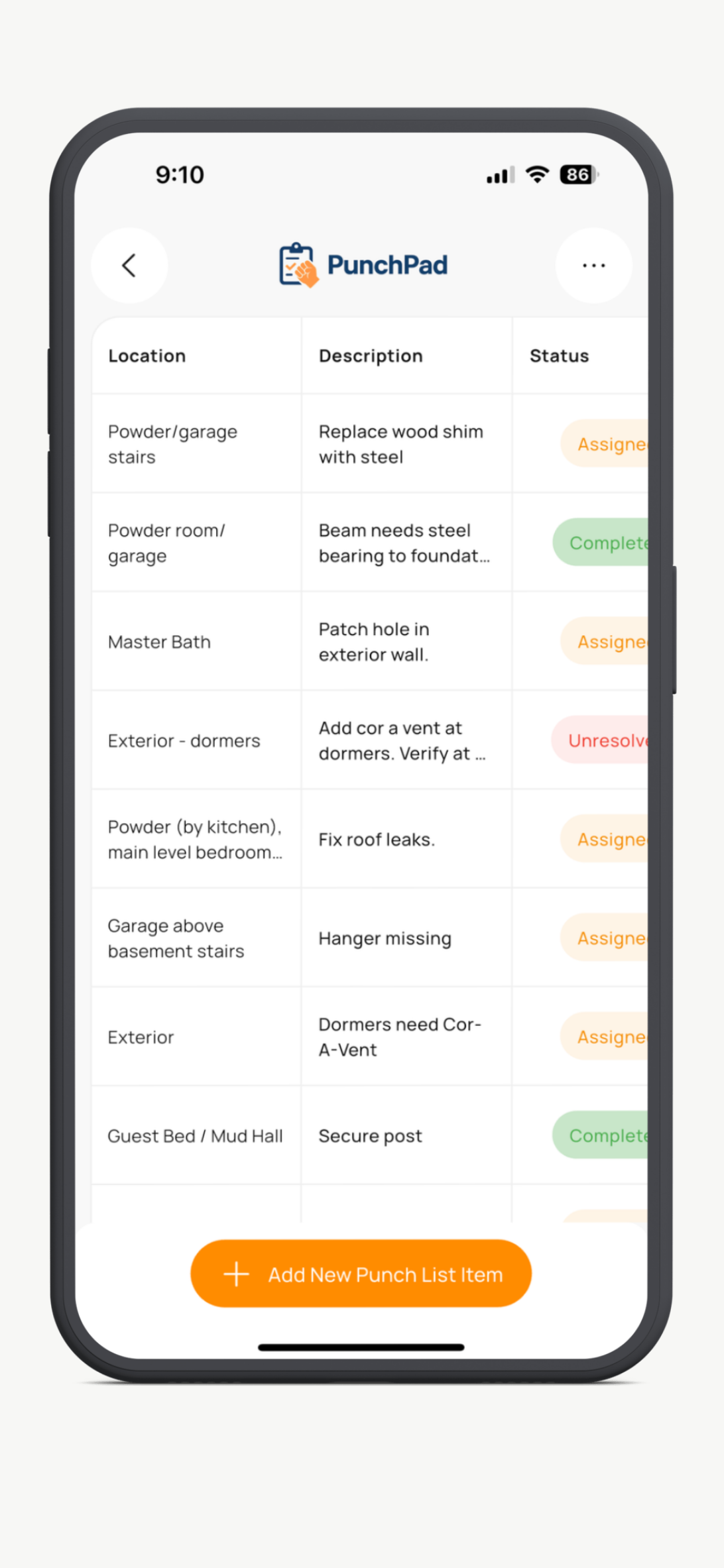
Every punch list item should include
Location
Be specific. Say primary bath vanity wall instead of bathroom.
Description
Write exactly what is wrong. Keep it short, direct, and easy to understand in the field.
Responsible subcontractor
Tag the trade that needs to handle the item.
Due date
If everything is open-ended, nothing gets done.
Photo
A clear photo removes confusion and cuts down on back-and-forth.
Status
Open, in progress, complete, or however your workflow is set up.
Notes
Use notes when needed for product details, correction instructions, or client-facing context.
How to Build a Punch List That Actually Works
Add items as soon as you see them
Do not trust memory. Do not save everything for Friday. Add items in the field while you are standing in front of them.
Use photos every time possible
Photos save time. They reduce arguments, speed up corrections, and make it easier for the field crew to understand the issue.
Keep descriptions short but specific
You are not writing a novel. You are writing a field instruction.
Assign the right trade immediately
Do not leave items unassigned unless you truly do not know who owns them.
Review and clean up the list regularly
Old, vague, or duplicate items make the list harder to trust. If the list feels sloppy, people stop respecting it.
Share one current version
If multiple versions are floating around, you no longer have a real punch list. You have confusion.
Common Punch List Mistakes
Waiting until the end of the project
This is the biggest mistake. It turns punch work into a rushed closeout scramble.
Using vague descriptions
If a trade has to call you to figure out what the item means, the list is weak.
Relying on spreadsheets that are never updated in the field
Spreadsheets can work for planning, but they usually break down during active field use because updates are slow and photos are clunky.
Letting subcontractors work from screenshots or old PDFs
The second someone forwards an outdated list, the wrong items get fixed and good time gets wasted.
Not including due dates
Items without deadlines tend to drift until the builder forces movement.
Mixing punch items with unrelated project notes
A punch list should be focused. It is not the place for every jobsite thought you have.
Paper, PDF, and Spreadsheet Punch Lists Break Down Fast
Paper punch lists are easy to start and hard to manage. PDFs look clean but go stale the second something changes. Spreadsheets are better for office tracking than field execution. None of them handle live updates well when the builder is walking the project, trades are in motion, and items are being completed throughout the day.
That is why a lot of builders end up texting photos, marking up screenshots, and re-sending the list over and over. The issue is not that they do not care. The issue is that the system was never built for real field use.
What Builders Need Instead
Builders need a punch list system that is fast to update in the field and easy for subs to follow without training, logins, or friction.