
Make Ready Checklist App for Rental Unit Turnover
Track make-ready tasks with photos, assign responsibility instantly, and keep unit turnovers moving.
Stop chasing turnover details across texts, notes, and spreadsheets. PunchPad helps landlords and property managers log make-ready items, track progress, and see exactly what’s left before move-in. Create a checklist for each unit, document issues with photos, assign tasks to your maintenance team, and share one live report that stays up to date — all from your phone or tablet.
The make-ready checklist landlords use instead of spreadsheets
PunchPad replaces messy turnover lists with one clear make-ready checklist per unit
Still managing make-ready work with spreadsheets, notes, or text messages? PunchPad replaces clunky turnover templates with a simple make-ready checklist built for real-world unit turnover.
Log make-ready items as you walk the unit, document issues with photos, assign responsibility, and track progress in real time. Everything stays in one place, so nothing gets missed and units move from vacancy to occupancy faster.
No scattered updates.
No outdated lists.
Just a clean way to run make-ready work from your phone or tablet.
Create a make-ready checklist from your phone
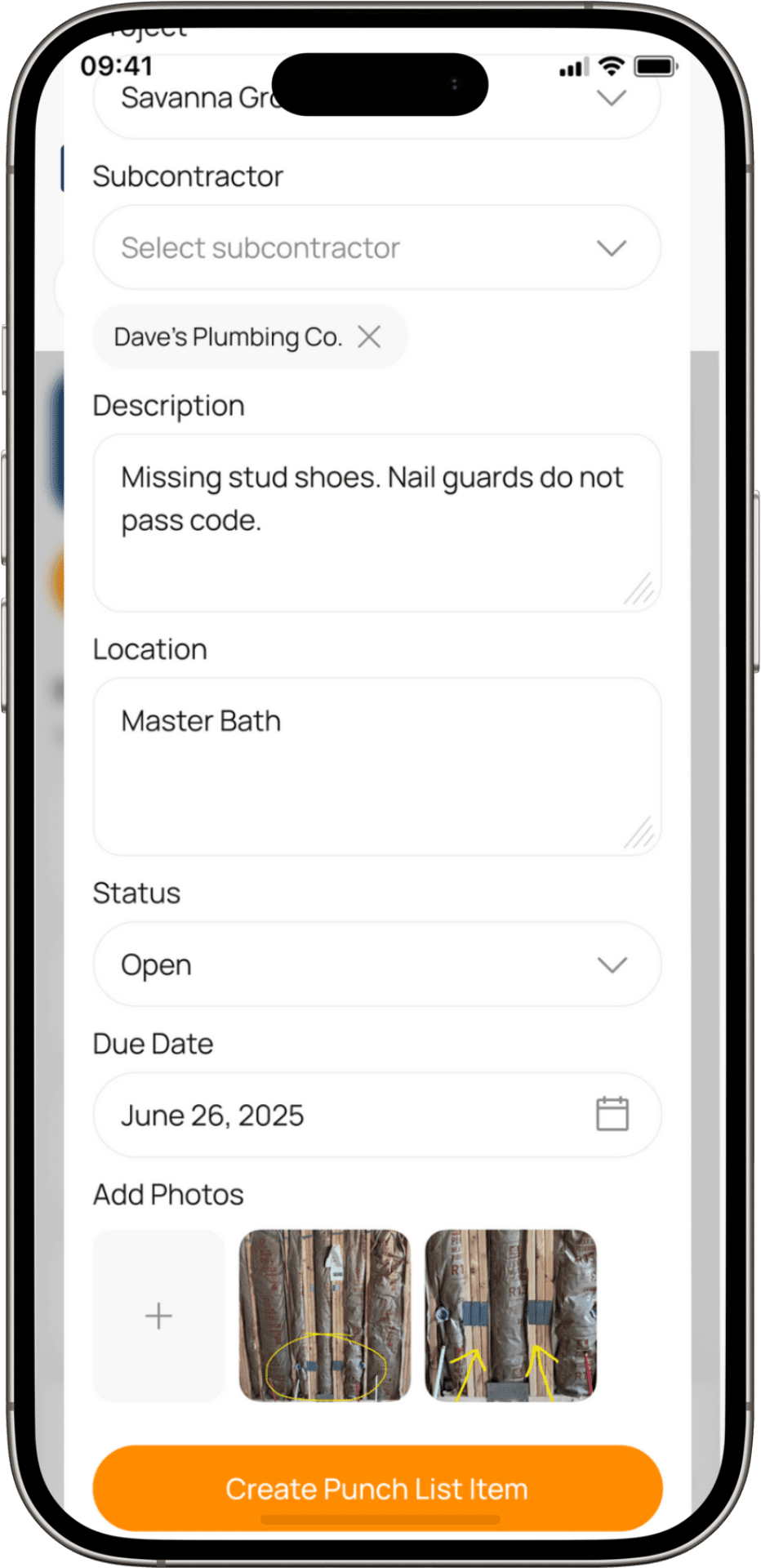
PunchPad lets you log make-ready items as you walk the unit. Add a clear description, attach photos, note the room or location, and assign responsibility in seconds.
No paperwork. No spreadsheets. Just a fast, mobile way to capture everything that needs attention during unit turnover.
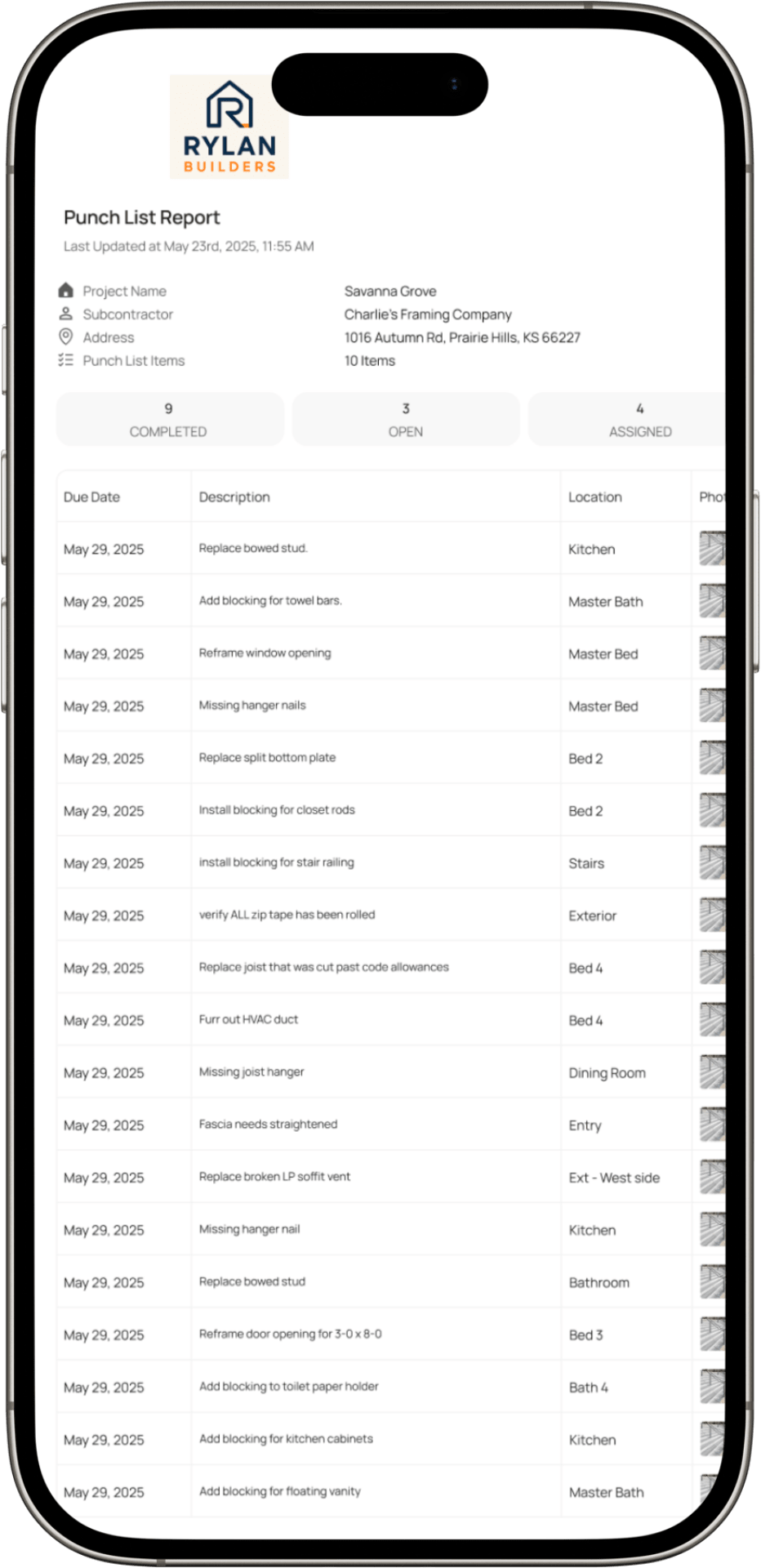
Share one live make-ready report — no PDFs, no resending
Send your maintenance team or ownership group a single live make-ready report that’s always up to date. As tasks are added, updated, or completed, the report updates automatically.
No PDFs to export.
No outdated attachments.
No follow-up emails asking for the latest list.
Everyone sees what’s due, where it’s located, and what’s still open — all from one link.
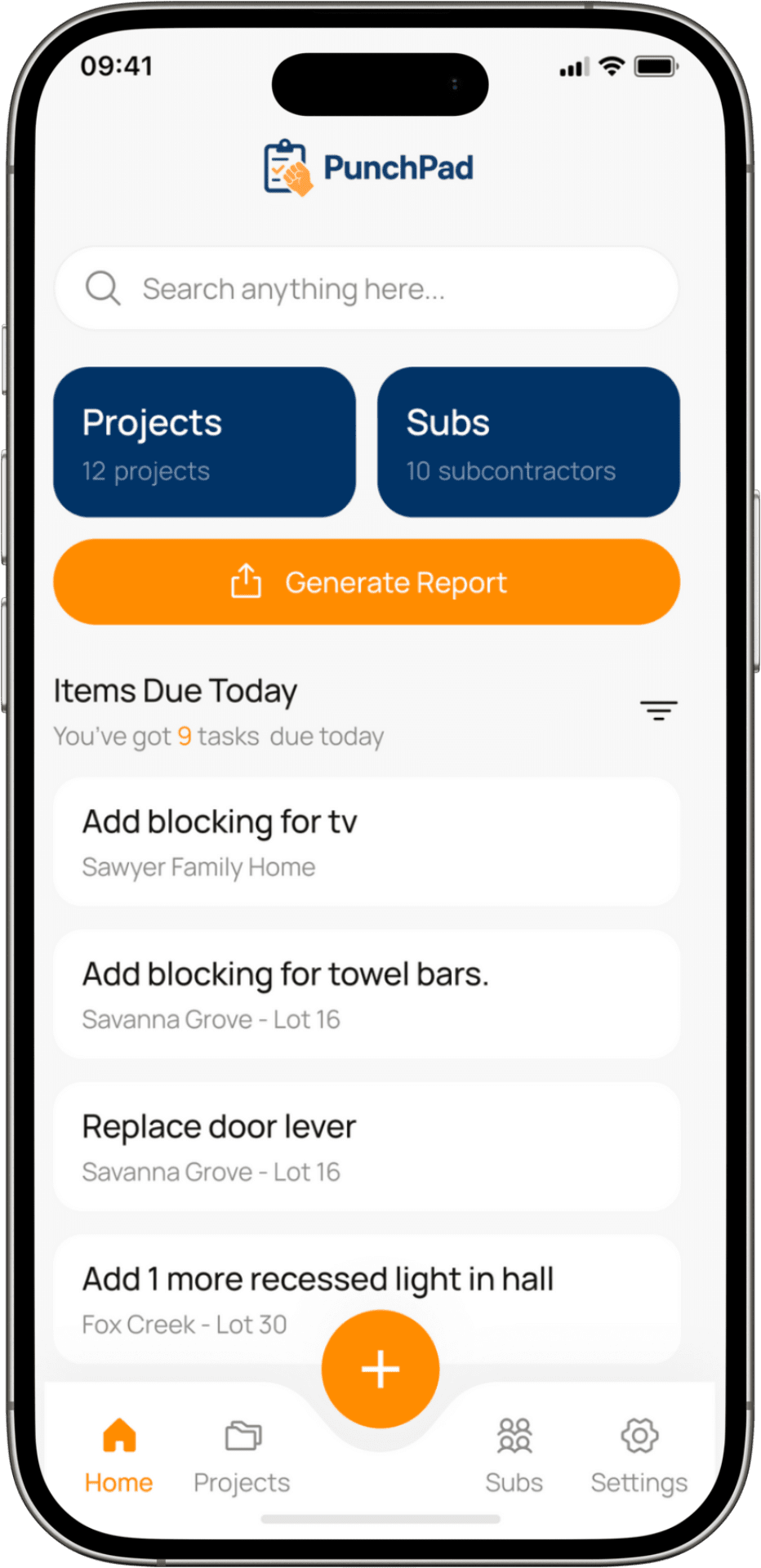
Track photos, assignments, and due dates in one place
Keep every make-ready task organized in a single view. See what’s due today, what’s still open, and what’s already been handled across all units.
Photos, locations, assignments, and due dates stay tied to each item, so nothing gets lost and you’re not digging through texts or notes to figure out status.
This gives you a real-time snapshot of turnover progress without spreadsheets, clipboards, or constant follow-ups.
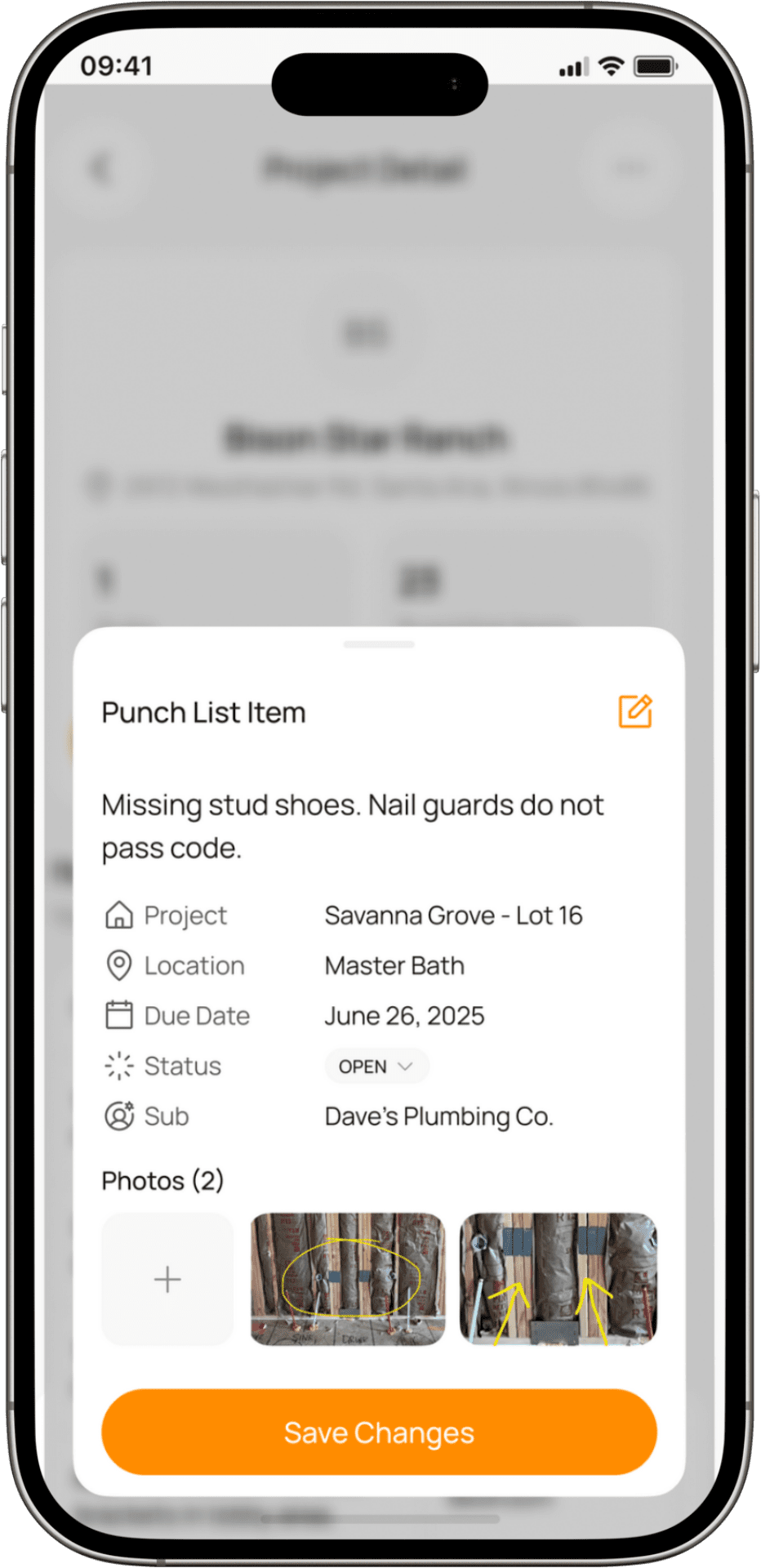
See every make-ready detail in one place
Each make-ready item shows all the details you need on a single screen — description, room or location, due date, status, and photos.
Tap an item, make an update, and move on. No bouncing between text threads, spreadsheets, or notes apps to figure out what’s been done or what’s still open.
This keeps make-ready work moving forward without losing details or context.
MAKE-READY BENEFITS OF USING A CHECKLIST APP
Fast setup with no training required
If your maintenance team can send a text, they can use PunchPad. There’s no training and no setup. Open the app, log make-ready items, assign responsibility, and keep unit turnover moving.
PunchPad is also commonly used as apunch list app for home builders, remodelers and GCs.
Replace spreadsheets and PDFs with one live make-ready checklist
PunchPad replaces scattered spreadsheets, PDFs, and email threads with a single live make-ready checklist per unit. Each item includes photos, notes, due dates, and status so nothing gets missed or delayed before move-in.
Built for real-world turnover, not bloated property software
PunchPad is intentionally focused on make-ready work. It’s not a full property management platform and it’s not trying to do everything. It’s built to handle the details that matter during unit turnover and keep them organized in one place.
If you’re currently using a make-ready spreadsheet or printed checklist, switching to a live checklist means every update stays synced and visible in real time.
If you’re using a punch list template, switching to a punch list app keeps every update synced across your team in real time.
Want to see what a solid make-ready checklist should include? Read our full breakdown →
Start your Make-Ready Checklist


Need help? support@punchpad.app
FREQUENTLY ASKED QUESTIONS
What is PunchPad?
PunchPad is a make-ready checklist app used to track rental unit turnover. It helps you log make-ready tasks, attach photos, assign responsibility, and see progress in real time from your phone or tablet.
Is PunchPad built for make-ready and unit turnover?
Yes. PunchPad works well for make-ready inspections, unit turnover, and final walk-throughs. Each unit gets its own checklist so nothing is missed before the next tenant moves in.
Do maintenance staff need to download the app?
No. You can share a live make-ready report that anyone can view on any device. No login, no account, and no app required for them.
What is a live make-ready report?
A live make-ready report is a shareable checklist link that always shows the current status of a unit. As tasks are added, updated, or completed, the report updates automatically without resending anything.
Can I add photos to make-ready items?
Yes. Each make-ready task can include photos so issues are clearly documented and easy to understand. This helps avoid confusion and back-and-forth during turnover.
Can I assign tasks to my maintenance team?
Yes. Make-ready items can be assigned so responsibility is clear and nothing falls through the cracks.
Is this for apartments or single-family rentals?
Both. PunchPad works for single-family rentals, small apartment buildings, and larger portfolios. Each unit is tracked separately with its own checklist.
Is PunchPad available on iPhone and Android?
Yes. PunchPad is available for both iOS and Android and is designed to be used in the field, not at a desk.
Is PunchPad a full property management system?
No. PunchPad is intentionally focused on make-ready and checklist tracking. It’s not an all-in-one property management platform and doesn’t try to replace your existing systems.
Can I try PunchPad without setting anything up?
Yes. You can download the app and start a make-ready checklist right away without any setup or training.
Download PunchPad
Need help? support@punchpad.app